Tiff files print out as blank documents
This is a problem with QuickTime. Do not allow QuickTime to handle Tiff files.
Here's how:
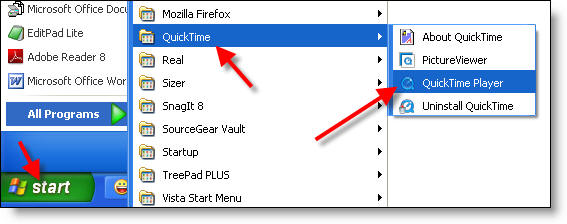
1) Launch QuickTime (typically via Start -> QuickTime -> QuickTime player).
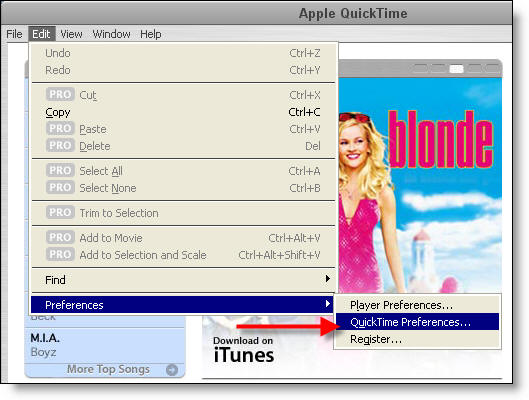
2) Go to Edit -> Preferences -> QuickTime Preferences.
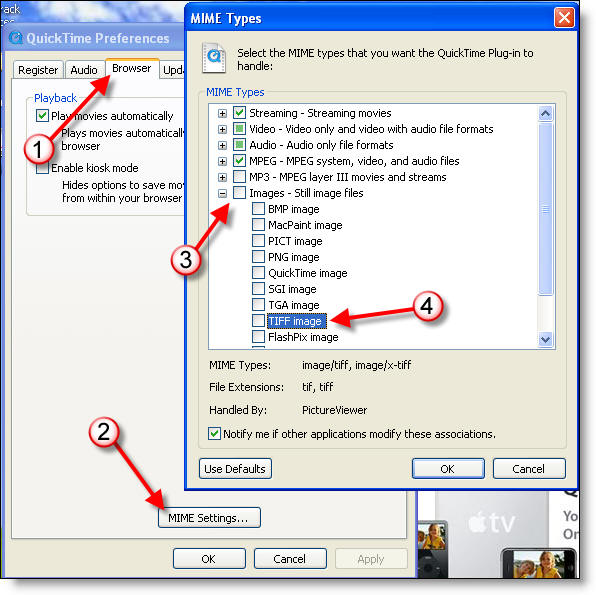
3) Click Browser -> MIME Settings... and then expand the Images Node. Ensure that TIFF image is NOT selected. Then, Click OK.
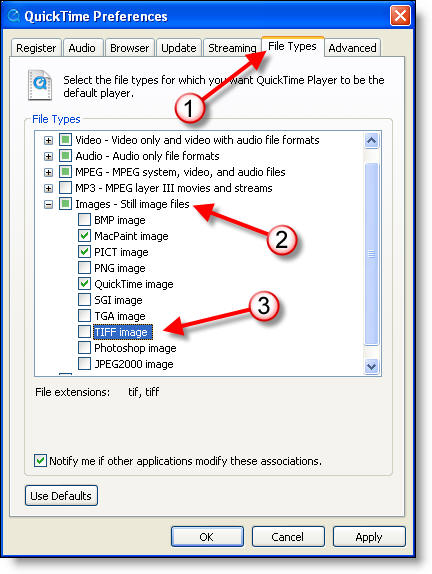
4) Click File Types and then expand the Images node. Again, ensure that TIFF image is NOT selected. Then, Click OK.
5) Click OK to close the QuickTime preferences window.
6) Click File -> Exit to quit QuickTime. You may need to restart your browser (close all windows) for the change to take affect.
7) Done!